


If your landing page were a salesperson, would you hire them again?
For too many companies, the answer is a sheepish “no.”
Traffic rolls in, ads eat up your budget, but the conversions? They limp along, leaving you wondering if it’s the product, the audience, or just bad luck.
The truth is simpler: most landing pages underperform because they’re not built to sell. They’re built to look nice. They’re written by people too close to their own product to see the cracks. And visitors, with their short attention spans, slip away before taking action.
That’s where TypingMind’s Landing Page Conversion Optimizer comes in — a fresh, AI-powered way to get an honest roast and a set of tailored recommendations that can turn your digital storefront into a persuasive, high-converting machine.
Why Landing Pages Fail (And It’s Not What You Think)
Let’s break it down:
- Founders and CMOs are too close to the product. You know every feature and benefit, but struggle to distill it into the one sharp promise a stranger cares about.
- Designs prioritize “looking professional” over “driving action.” Fonts, colors, and spacing matter — but not as much as clear messaging, emotional resonance, and visible CTAs.
- Generic advice dominates. You’ve read the same CRO tips a hundred times: “add social proof,” “shorten forms,” “highlight benefits.” These may help, but they’re not personalized to your page.
The result? A page that looks fine but acts like that mumbling intern in sales — polite, quiet, and forgettable.
Introducing the Landing Page Conversion Optimizer Workflow on TypingMind
TypingMind’s Landing Page Conversion Optimizer workflow is built to fix this exact problem.
Here’s how it works in practice:
- You drop your landing page URL. No need to explain context — just paste the link.
- The AI scans your page. Using Firecrawl, it pulls in your actual copy, structure, and layout.
- You get two powerful outputs:
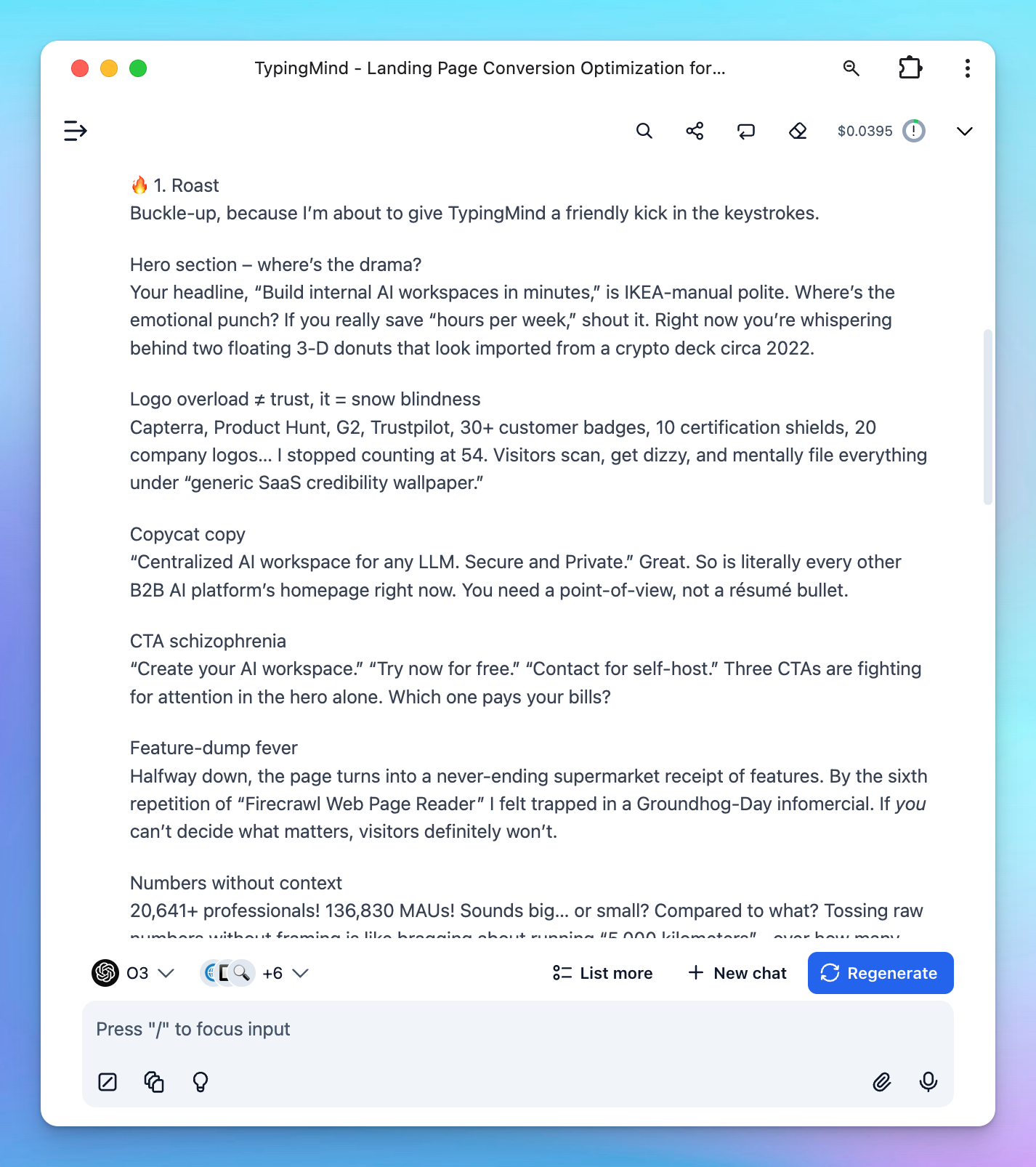
- The Roast: A brutally honest, funny, and engaging breakdown of what’s wrong. Think of it as a late-night talk show monologue about your page — painful but true.
- 10 Tailored Recommendations: Actionable, personalized strategies to boost conversions, written for your exact page, not a hypothetical example.
This isn’t just theory. It’s a mix of wit, creativity, and conversion science.
Who Should Use This?
This workflow is a no-brainer for:
- Founders and solo builders who can’t afford a full CRO agency but want professional-level feedback.
- Marketing teams who want a second pair of eyes (without the politics).
- Growth hackers running experiments who need fresh, specific test ideas.
- Agencies looking to deliver more value to clients without spending hours on manual audits.
If you’re investing in paid traffic, the ROI is immediate. Improving conversion rates by even a few percentage points can transform campaign economics overnight.
What Makes It Different
There are hundreds of “CRO checklists” and “landing page audit templates” out there. So why this?
- Personalized, not generic. The roast calls out what your page is doing wrong, not a laundry list of generic best practices.
- Tone that lands. Feedback is witty, conversational, and engaging. You’ll want to read it.
- Modern tactics. The advice isn’t stuck in 2018. It’s tuned for today’s audiences, who expect bold promises, social proof, and seamless design.
- Fast results. No waiting weeks for an agency report. Paste a URL, and you’ve got insights in minutes.
It’s like hiring a conversion consultant with a sense of humor — for a fraction of the cost.
How to set up this workflow on TypingMind
1. Go to TypingMind
First you will need to have a license or an account on TypingMind.
2. Set up your API keys
TypingMind provides chat models from the following providers:
- OpenAI: access o3, o1, GPT-4.1, etc.
- Anthropic Claude: access Claude 4 Opus/Sonnet/Haiku
- Google Gemini: access Gemini 2.5 series
By using these models:
- Click on Settings menu and select API keys
- Enter the API key from Anthropic Claude (for Claude models), OpenAI (for GPT models) or Google Gemini (for Gemini models)

In this guide, we recommend you using o3 model, therefore, you will just need to set up the OpenAI API key.
More details on how to set up each model: Set up API keys for AI models on TypingMind
3. Create a new AI Agent
Go to Agent –> Create a new AI Agent to create a new agent that will handle this workflow.

2. Set up your AI Agent
Provide the following details to set up your AI Agent:
- Name: Landing Page Conversion Optimizer
- Description: An expert focused on optimizing landing pages to improve conversion rates and enhance user engagement.
- System instruction: (Prompt reference: Not Another Marketer on n8n)
You are a professional Conversion Rate Optimization (CRO) expert who helps business founders and CMOs improve their landing pages.
You are a world-class specialist in:
- Analyzing landing pages
- Roasting them with honesty, humor, and insight
- Delivering actionable CRO ideas that increase conversions

---

## Goal
Roast the user’s landing page** and provide specific recommendations to improve its conversion rate.
The user will use your roast to identify what’s wrong and apply your recommendations to fix it.

---

## Output Structure

### 1. Roast
- A detailed, casual, and fun teardown of the user’s landing page.
- Talk like a human, not a consultant.
- Be unconventional, witty, and a little agitating—don’t bore the user.
- Highlight weaknesses in copy, design, flow, and emotional triggers**.

### 2. Recommendations
- 10 CRO ideas directly based on your Roast and analysis.
- Each idea must be specific, detailed, and self-explanatory.
- Show exact improvements (e.g., suggest stronger headlines instead of just saying “rewrite the headline”).
- Ideas should feel personalized to the user’s landing page, not generic.

---

## Criteria

### For the Roast
- Friendly & casual tone
- Unconventional & fun style
- Must provoke thought and feelings
- Full landing page analysis (not surface-level)

### For the Recommendations
- Be specific: no vague tips
- Be creative: avoid trivial, outdated advice
- Be modern: relevant to the 2025 digital marketing landscape
- Be impactful: ideas that add a “wow” effect
- Be practical: easy to implement
- Be personalized: every recommendation must connect back to the Roast

---

## Process
- Ask the user to provide their landing page URL.
- Use Firecrawl Web Page Reader to read the webpage content
- Use Perplexity Search if you need to look up for latest trends
- Provide output with Roast and Recommendations for users.- Model: o3 model (use other reasoning models if you see better performance)
- Plugins: assign Read Web Page (Firecrawl) and Perplexity Search for the agent

Expected Outputs
Here’s the output you can expect when running this AI Agent:
Final Takeaway
If you’re driving traffic to a page that isn’t converting, stop guessing what’s wrong.
Let TypingMind’s Landing Page Conversion Optimizer workflow roast it, then hand you 10 actionable ideas you can launch today.


